


Dylan NathanHTC VIVE — Eagle AI System20+
Engineered Prompt Classes
12
Supported Languages
4
LLMs Evaluated
100s
Issues Tracked & Resolved
01 — Overview
What is Eagle?Eagle is HTC's AI-powered smart eyewear platform. At its core is Vive — an AI assistant that responds to voice queries, analyzes visual context through the device camera, and surfaces relevant information hands-free. The system spans 20+ distinct interaction modes: from identifying plants, animals, and landmarks, to translating foreign text, reviewing nearby restaurants, and summarizing news — all delivered as brief, spoken responses optimized for an audio-first wearable interface. As Principal Designer, I owned the complete AI prompt architecture solo — working closely with engineering to implement and refine, and with a PM to prioritize features. The product shipped in 2025, with Taiwan as the primary launch market, which introduced significant multilingual complexity from day one.
The hardest part of AI interaction design isn't the technology. It's the discipline to make it simple, consistent, and trustworthy across every edge case — at scale, across languages, across models, across interaction types.
On a screenless wearable, every AI response competes with the physical world for attention. Clarity isn't aesthetic — it's functional. The design challenge was building a system that behaves consistently across dozens of distinct interaction types, seven languages, and four different underlying LLMs, while outputting responses that work when spoken aloud. 02 — System Architecture
How the system routes queriesEagle AI Middleware classifies every query before dispatching to the appropriate prompt class and external service. Voice input, button-triggered actions, and automatic photo detection each enter the pipeline differently — routed to one of four branches: Phone Assistant, Glasses Action, Verbal Query, or Visual Query. The architecture distinguishes between two prompt types with fundamentally different behaviors. Chat prompts maintain conversation history for stateful interactions. Plugin prompts are stateless — essential for all image-based queries where prior context doesn't carry over. 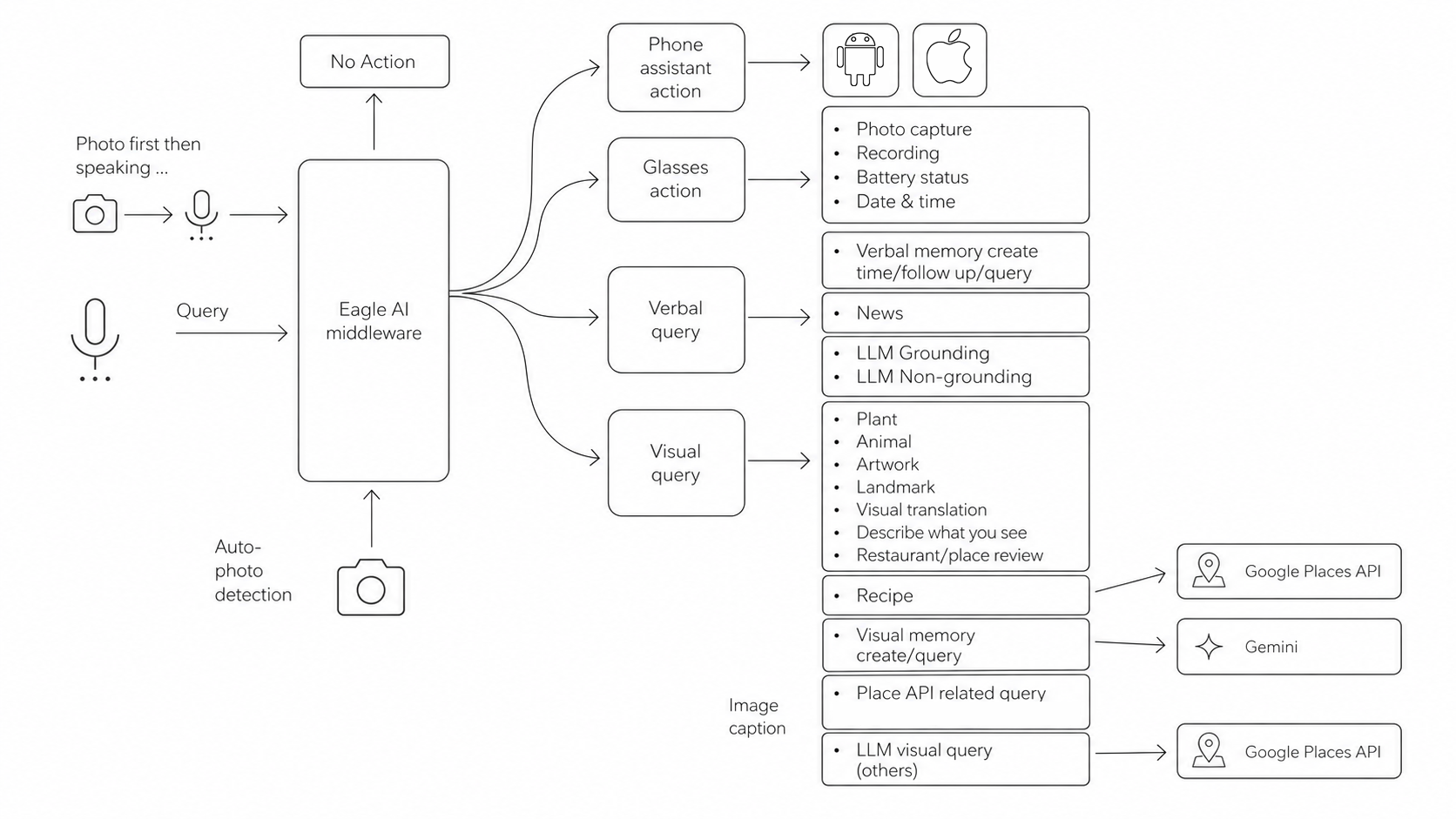
03 — Prompt Design System
A repeatable engineering methodologyEvery prompt was built from a standardized anatomy — ensuring behavioral consistency across 20+ classes and enabling systematic iteration. The anatomy was applied regardless of prompt type, with optional components added as the interaction required. 01
Role & Objective
Establishes the AI persona and task scope. Specific to the interaction, not generic.
02
Guidelines & Context
Broad behavioral advice and any contextual data the model needs to perform the task.
03
Instructions
Step-by-step procedural commands. Numbered. Explicit. No ambiguity.
04
Constraints
Hard guardrails — what the model must not do, regardless of user request.
05
Tone
Controls register: conversational, dry, professional. Audio delivery shapes every word choice.
06
Error Handling
Explicit failure state responses for every foreseeable edge case and unsupported request.
07
Few-Shot Examples
Input/output pairs that anchor expected response format and behavior.
08
Response Format
Output structure: plain text, JSON, word limits, no markdown, no URLs.
09
Reminder & Safeguards
Reinforces critical rules at prompt end to prevent behavioral drift in long sessions.
Prompt taxonomyEach prompt class handles a distinct interaction type with its own input modality and AI capability requirements.
Multi-stage prompt pipelinesTwo interaction types required chained prompt architectures — where one prompt's output becomes the next prompt's input. This improved accuracy over single-prompt approaches by separating classification from response generation. Ingredients → Recipe: A first prompt identifies and lists all visible ingredients from the camera image, outputting a structured ingredient list. A second grounding prompt receives that list and suggests dishes using real-time recipe sources. Splitting the task improved ingredient identification accuracy significantly over a combined approach. Signboard → Restaurant (B8/C9): A signboard detection prompt extracts the store name via OCR and outputs a structured Type/Text/Language schema. That name is passed to a Places API lookup, whose results feed a restaurant review prompt (C9). Three sequential stages, two engineered prompt classes. The B8 challengeB8 was the most complex prompt in the system — a monolithic chain designed to handle any image that didn't fit a preset category. It had to execute three sequential behaviors in one prompt: signboard detection → landmark identification → general scene description, with conditional fallthrough between each stage. The primary engineering challenges were chain-breaking (the model responding at Stage 1 even when no sign was present), output schema enforcement (returning plain text instead of the required structured format), and false landmark detection (identifying non-landmark buildings as famous ones). Each required distinct prompt interventions — explicit STOP instructions, numbered template sections with concrete examples, and location-aware constraints tying identification to the user's GPS proximity. As Gemini improved from Flash 2 → 2.5 → 3, B8 became progressively more stable — demonstrating that monolithic chaining is viable when the underlying model is capable enough, but complex chaining ultimately belongs in system architecture rather than a single prompt. 04 — Multi-Modal Visual Queries
Designing for the camera as an inputThe visual query family is the most complex subsystem — nine prompt classes sharing a common input (the device camera) but requiring distinct recognition capabilities, behavioral rules, and failure states. Each was tested against a broad set of images including deliberately empty frames to verify failure handling. 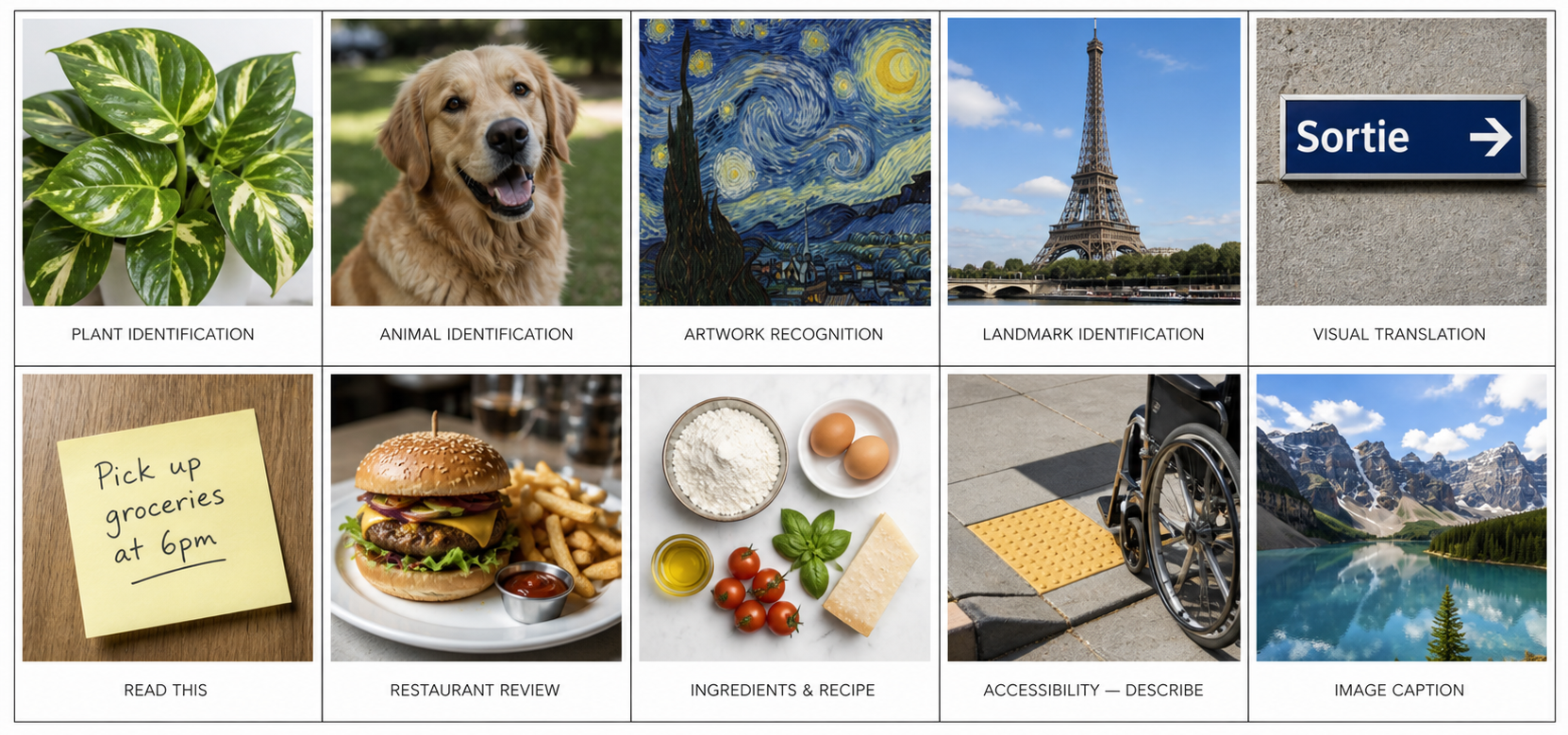
Pointing gesture as an interaction primitiveA deliberate design decision: the system detects whether a user's index finger is pointing at something in the camera frame and responds to the pointed object, not the general scene. This required precise prompt engineering — not just enabling the capability but making it reliable. The detection logic required: an index finger extended with a clear directional line from fingertip to a specific object, with other fingers curled or closed. Cropped fingers, hands merely present without direction, and ambiguous gestures are explicitly not treated as pointing. When pointing is detected the response leads with acknowledgment and addresses the pointed subject specifically. When ambiguous, the system falls back to general scene description — ensuring no false positive attributions. 05 — Voice-First Output Design
Formatting as a functional requirementEvery response is spoken aloud on a wearable device. Output formatting constraints aren't stylistic — they're functional requirements for audio delivery. Each rule below was implemented across all 12+ prompt classes. No Markdown or HTML
Markdown syntax, bold markers, bullets, and headers all read as literal characters when spoken. Every prompt explicitly strips all formatting.
No asterisks, no dashes, no headers in any response across all prompt classes.
No URLs in Audio
Links cannot be spoken intelligibly. All prompts explicitly ban URLs from audio responses. A separate links section in the output schema handles clickable references.
"Your response will be rejected if it includes any links."
30-Word Hard Limit
The Vive chat prompt enforces a 30-word ceiling — reinforced three times in the prompt. Responses are revised internally until the limit is met.
"Never exceed 30 words. If longer, revise until 30 words or fewer."
Sports Score Formatting
A discovered edge case: text-to-speech reads "3-2" as "three negative two." All news and chat prompts were updated to require spelled-out scoring.
"Interpret the hyphen '-' as 'to' not 'negative' when reading scores."
No Prefatory Phrases
Filler openers like "Good morning" or "Great question!" waste words and sound patronizing on a wearable. All prompts prohibit them explicitly.
"Do not start responses with any prefatory phrases."
Language Parity
Responses must match the device language exactly. Prompts handle 12 supported languages and gracefully decline 3 unsupported ones including Cantonese and Korean.
12 supported · 3 explicitly declined · Wrong language = response rejection.
06 — Quality, Iteration & Challenges
Iteration processAll prompts were evaluated on Google Vertex AI before deployment — not just in conversation. The process followed a define → write → test → evaluate → refine → ship loop, with the feedback arrow returning from testing directly to writing. Prompt section ordering was treated as a design variable — moving constraints before or after instructions often changed model behavior meaningfully. Issue trackingEvery post-ship issue was logged in the PQCS system. Hundreds of tickets were triaged, diagnosed, and resolved — with prompt changes tracked against specific issue numbers. The primary issue categories were: Language & Localization
Responses delivered in wrong language despite explicit language rules
Traditional Chinese characters appearing in English-language responses
zh-TW vs zh-CN confusion — distinct scripts treated as interchangeable
Cantonese speakers requesting zh-TW receiving incorrect responses
Ambiguous terms requiring explicit translation examples (新聞 vs 消息)
Visual Recognition
Pointing gesture falsely detected when hand was merely present in frame
Pointing at wrong object when finger was partially cropped
Signboard misidentification on ambiguous or low-contrast signs
Non-landmark buildings identified as famous landmarks
Image too blurry — model guessing rather than declining
Audio Output Formatting
URLs appearing in spoken responses despite explicit prohibition
Sports scores read as negative numbers ("3 negative 2")
Markdown formatting spoken aloud as literal characters
Responses exceeding word limits despite hard ceiling rules
Grounding & Accuracy
News returning outdated or hallucinated information when grounding failed silently
Nearby returning locations not in the user's immediate area
Recipe links broken or incomplete due to grounding inconsistency
Pre-existing ChatGPT system prompts overriding custom formatting rules
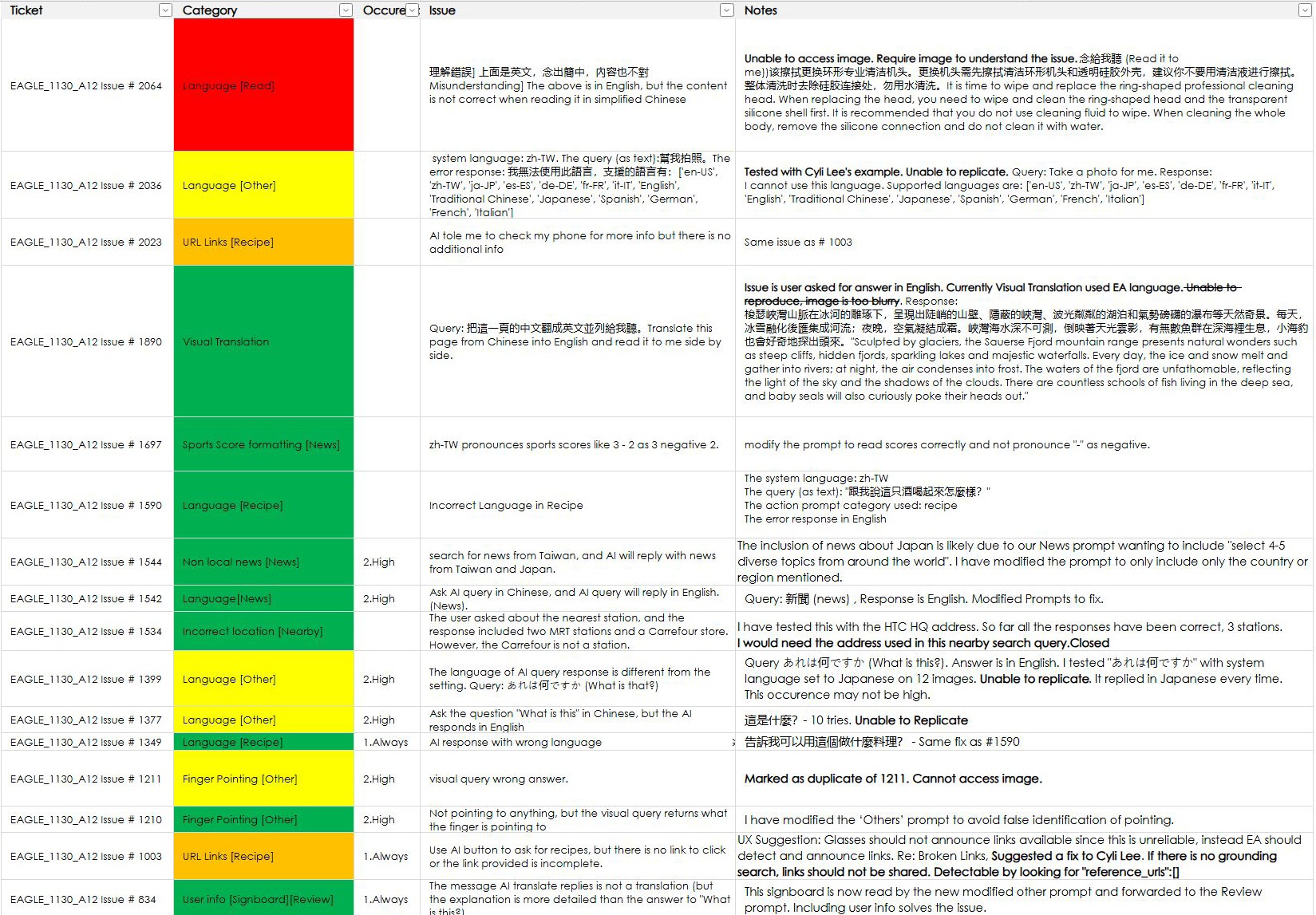
Sample of logged issues from the Eagle PQCS quality tracking system. Color indicates severity — red: critical, yellow: in progress, green: resolved. Systemic challenges & mitigationsChallenge
Grounding Inconsistency
Gemini's dynamic retrieval mechanism doesn't always activate reliably. When grounding fails silently, the model returns responses based on training data — presenting stale or hallucinated information as current. For News and Nearby, which required 100% factual accuracy, this was unacceptable. Dozens of prompt iterations were needed to stabilize behavior.
Mitigation
Set grounding threshold to 0 for the Recipe pipeline to force consistent behavior. For News, structured the prompt to prioritize provided sources over model memory. Added output monitoring for embedded links as a grounding detection signal — if links appeared, grounding had triggered and content was current.
Challenge
Pre-Existing System Prompt Conflicts
LLMs like ChatGPT carry pre-existing system instructions that override custom prompts. ChatGPT's default news formatting — bullet points, titled sections, embedded links — persisted despite explicit instructions to suppress it. The model's own defaults competed directly with the voice-first output requirements.
Mitigation
Solved through strong Persona and Objective framing at the prompt's opening — establishing a distinct role ("You are a news summarizer") that competed with and ultimately overrode the default behavior. Required significant iteration to find the right framing weight.
Challenge
Multilingual Localization Edge Cases
Eagle launched primarily in Taiwan, requiring English and Traditional Chinese to coexist without cross-contamination. LLMs are not naturally rigid about language boundaries. Issues included responses in the wrong language, zh-TW vs zh-CN confusion, and Cantonese speakers triggering incorrect behavior.
Mitigation
Added explicit language codes to every prompt, specified zh-TW vs zh-CN distinction throughout, included example translations for ambiguous terms, and built graceful decline responses for unsupported languages. Language compliance became one of the highest-volume QA categories.
Multi-LLM feature evaluationPrompts were evaluated across four LLMs to assess portability and capability coverage. Gemini Flash 2 and ChatGPT 4.1 were selected as production models based on the results.
07 — Custom Prompt Builder
A meta-prompt systemThe Custom Prompt Builder is a prompt that writes prompts. A user speaks a raw, casual instruction — "tell me about any zoo I'm near" — and the system converts it into a fully structured, safety-aware, language-compliant AI prompt ready for downstream processing. This lets Eagle extend its own AI capabilities beyond preset prompt classes without requiring engineering intervention. 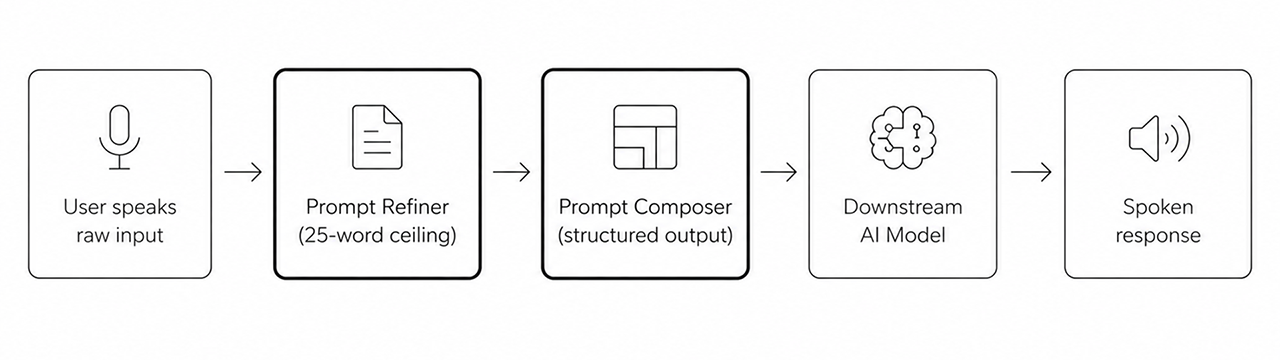
The system uses a two-stage pipeline: a Refiner (25-word ceiling) compresses and clarifies the user's intent, then a Composer builds the full structured prompt with numbered instructions, safety boundaries, language constraints, and photo context. Whether a photo is required changes the entire prompt structure — the builder detects this and adds or removes visual analysis steps accordingly. Iteration arc — 8 documented versionsv1
Basic Refiner
Starting point
Simple 25-word prompt cleaner. Converts casual speech to a clean query. Photo flag acknowledged but not structurally used in output.
v2
Composer Added
Refiner too shallow
Introduced the Composer as a second stage. Output is now a full structured, numbered prompt with safety boundaries and language constraints.
v3
Response Length Tiers
One-size output
Added brief / standard / detailed length tiers (60 / 80 / 100 words). Length preference is passed as an input variable and embedded in the generated prompt.
v4
Specific Intro Line
Generic persona framing
Required an introductory line tailored to the user's specific query — not "You are an AI assistant" but "You are an AI expert in identifying zoos."
v5
Interesting Fact Rule
Flat, utilitarian output
Added an instruction to surface one little-known fact about the identified subject — improving engagement without increasing response length.
v6 ↗
GPS Privacy Rule
Location data leakage — bug found
Discovered the builder was hardcoding user GPS coordinates into generated prompts. Added explicit rule: reference location dynamically, never hardcode address or GPS.
v7 ↗
Self-Suppression Rule
Pipeline short-circuiting — bug found
The builder was occasionally answering the user's question directly instead of building a prompt. Added: "Do not answer — only output the prompt." The most counterintuitive constraint in the system.
v8
Language in {language}
Language boilerplate hardcoded in English
Language constraint lines were previously output in English only. Updated to output in the user's {language} — ensuring non-English users receive fully localized instructions.
08 — Meeting Summary
Schema design & structured outputThe Meeting Summary feature required designing both the prompt architecture and the JSON output schema — working from an engineering-provided spec and iterating toward a structure that served three distinct display modes: Detailed, Default, and Concise. The engineering schema provided flat keypoints with raw quote arrays. My redesign introduced hierarchical structure, word limits per field, speaker attribution with timestamp formatting, and the insight layer — renamed from "quotes" to allow supporting points that aren't always direct quotations. A subtitle field was added in v8 to give each summary richer context beyond its subject line. A key technical discovery: setting max output tokens to 500–1000 truncated the JSON response. The budget needed to cover input transcript, output JSON, and schema overhead simultaneously — requiring a minimum of 1500 tokens to function reliably. Three Display Modes
Detailed
Full hierarchical keypoints with nested insights, speaker attribution, timestamps, action items, and open questions. Approximately 350 words. Designed for full review and long-term archiving.
Default
Keypoints with speaker and timestamp attribution, action items included. Open questions omitted. Approximately 255 words. The everyday meeting record.
Concise
Keypoints only, no attribution, no open questions. Approximately 100 words. Designed for quick review when context is already known.
09 — Reflections
What this project taught meGrounding is not reliable by default
Gemini's decision to ground or not was arbitrary — often returning hallucinated or outdated training data for News and Nearby queries that required 100% factual accuracy. No single prompt change fixed this. Stability required setting explicit thresholds, structuring prompts to prioritize live sources, and using output signals (embedded links) to detect when grounding had actually triggered. It remains the most consequential reliability challenge in the system.
Multilingual rigidity is hard to enforce
LLMs are not naturally rigid about language boundaries. Eagle's Taiwan launch required English and Traditional Chinese to coexist without cross-contamination — a constraint that produced the highest volume of post-ship issues. Enforcing zh-TW vs zh-CN, preventing wrong-language responses, and handling transliteration edge cases required explicit rules that had to be reinforced repeatedly across every prompt class. The lesson: language compliance must be designed in from the start, not patched in later.
Complex chaining belongs in architecture, not prompts
B8 demonstrated the ceiling of monolithic prompt chaining. Synthesizing multiple behaviors into one prompt was intellectually interesting and became more viable as Gemini improved, but the fragility was real. Chain-breaking, false detection, and schema drift were all fundamentally architectural problems being solved at the prompt level. Future systems should route this complexity upstream.
Image recognition requires prompt guardrails, not just capability
Gemini's visual capabilities are powerful but imprecise without constraint. Pointing gesture detection, landmark identification, and signboard recognition all required careful prompt engineering to prevent over-identification, hallucination, and false positives. The model's defaults were optimistic — the prompt's job was to make it appropriately skeptical.
Meta-prompt systems introduce novel failure modes
The Custom Prompt Builder behaved in ways no other prompt did — answering instead of composing, hardcoding private data, generating generic rather than specific instructions. Each failure required a constraint that didn't exist in any other context. The self-suppression rule in particular — telling a prompt not to do the thing it was designed to help with — was a genuinely new kind of design problem.
Voice UX is a discipline of its own
Defining the AI's spoken voice — tone, length, pacing, format — was as important as the underlying prompt logic. Every formatting rule was a functional UX decision: the 30-word limit exists because longer responses lose attention on a wearable; the score formatting rule exists because text-to-speech is literal. Audio-first output design requires treating the model's output as a script, not a document.
Made in California
|