


Dylan NathanMagic Leap One — Spatial Onboarding & Lumin OSOverview
Defining how the world first experienced spatial computingMagic Leap One launched in August 2018 as a pioneering mixed reality wearable — the first device running Lumin OS, the world's first spatial operating system. I designed the spatial onboarding experience that introduced users to the fundamentals of the device, the interaction model, and the idea that digital objects could coexist with the physical world. This work established the visual and interaction language of Lumin OS — from the 3D iconography of the app navigator to the animation standards that governed every transition across the operating system. The goal throughout was to make something that felt less like software instruction and more like a moment of genuine wonder. Multiple patents were awarded for this work in spatial interface and interaction design. 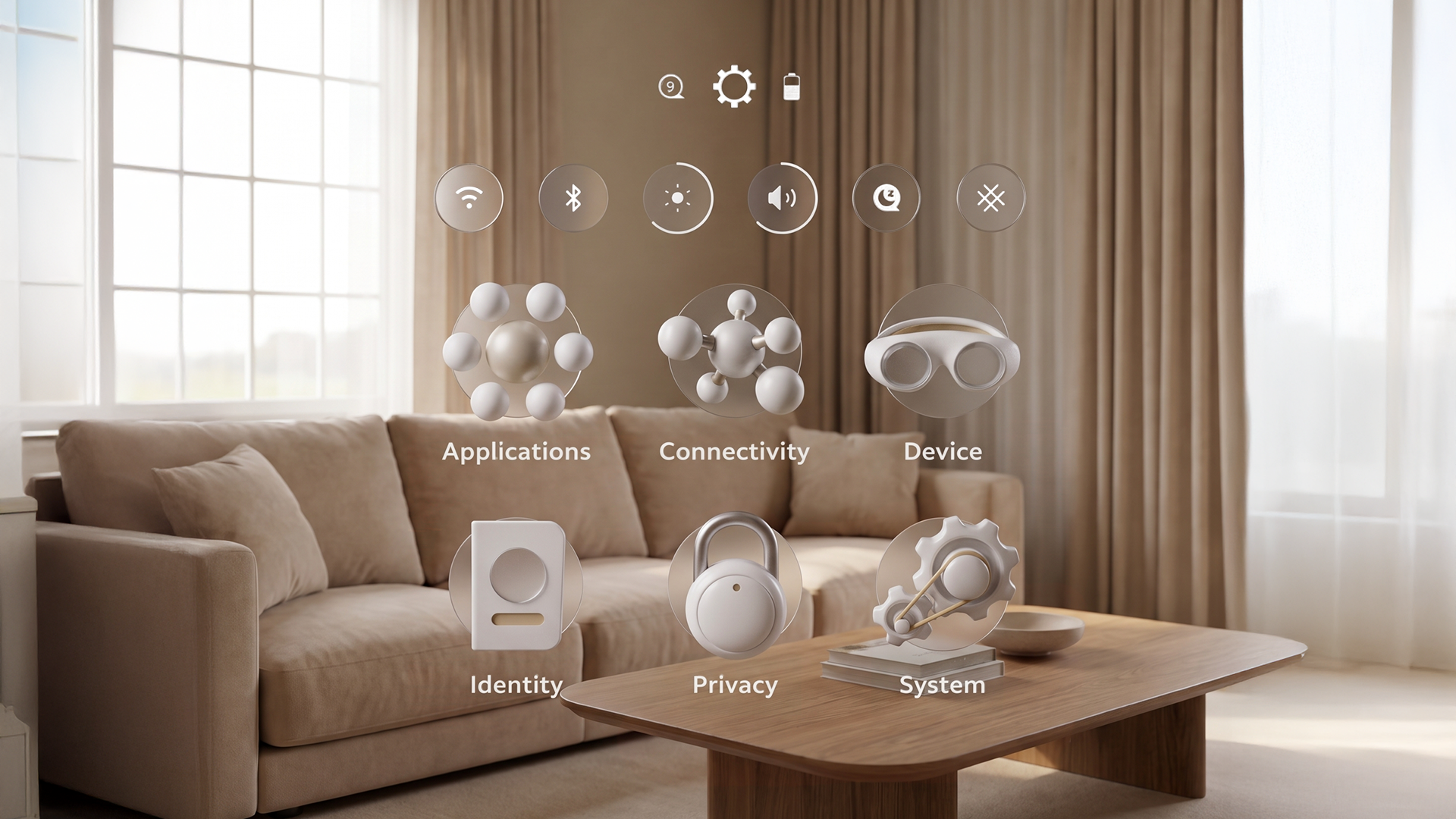
Settings icons — designed, animated, and refined across all interaction states, with standards extended to third-party developers
Lumin OS
A design language for the world's first spatial operating systemThe interaction patterns and visual vocabulary developed through onboarding became the foundation of Lumin OS — the operating system running on Magic Leap One. The app navigator uses circular portal icons drawn directly from the onboarding aesthetic, creating visual continuity between a user's first experience of the device and their ongoing use of it. I designed, animated, and refined the interaction states for the settings iconography across every state — idle, hover, selected, active — and worked with third-party developers to establish standards for creating their own icons within the system. The settings application itself was one of the most complex interaction design challenges on the platform: a spatial settings system with no existing precedent, requiring original thinking about hierarchy, navigation, and legibility in three-dimensional space. 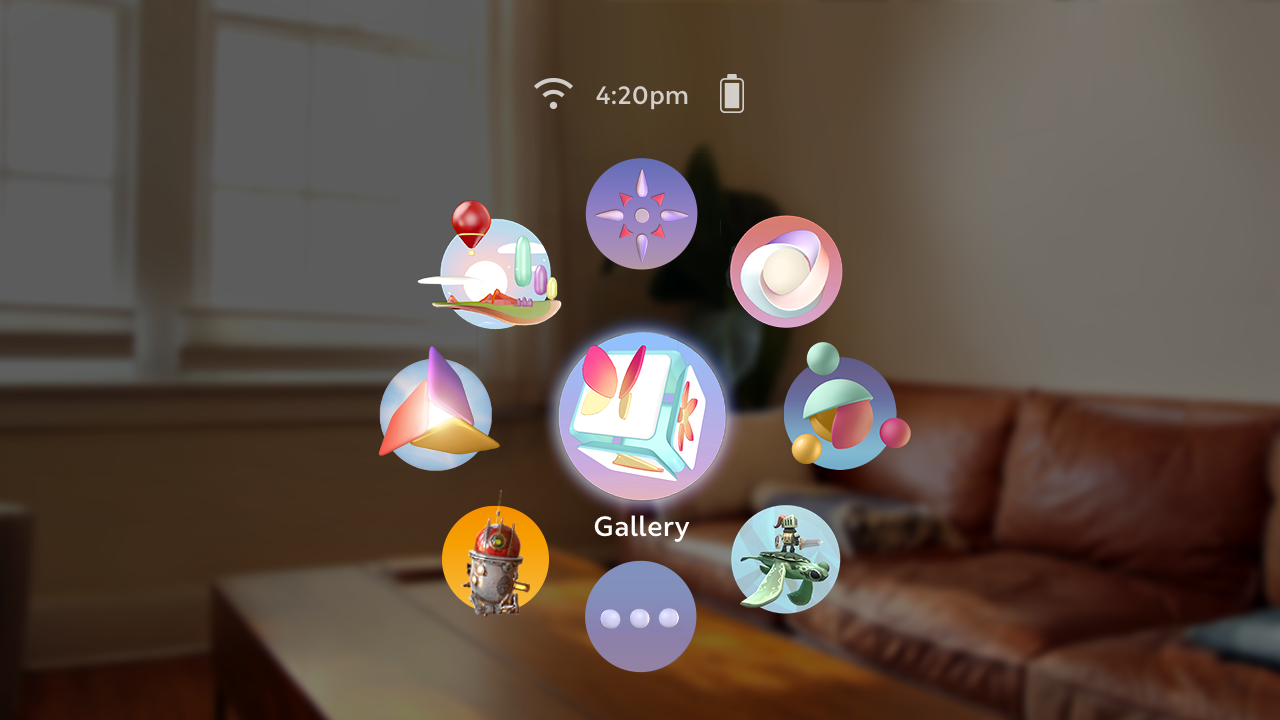
Lumin OS app navigator — circular portal iconography drawn from the onboarding visual language
Spatial Onboarding
Teaching spatial computing through interaction, not instructionThe spatial onboarding experience introduced users to the fundamental concepts of mixed reality — that digital objects exist in three-dimensional space, respond to gesture and controller input, and coexist with the physical world around them. Rather than relying on text-heavy instruction screens, the experience taught through doing: placing a miniature tree on the user's own table and inviting them to interact with it, rotate it, and manipulate it in three dimensions. This approach — learning through a moment of curiosity and play — became the design philosophy that ran through everything from the Moton to the Startup Islands. The interaction patterns and visual motifs developed here carried forward into the broader Lumin OS design language shown above, including the circular portal iconography across the app navigator and settings system. 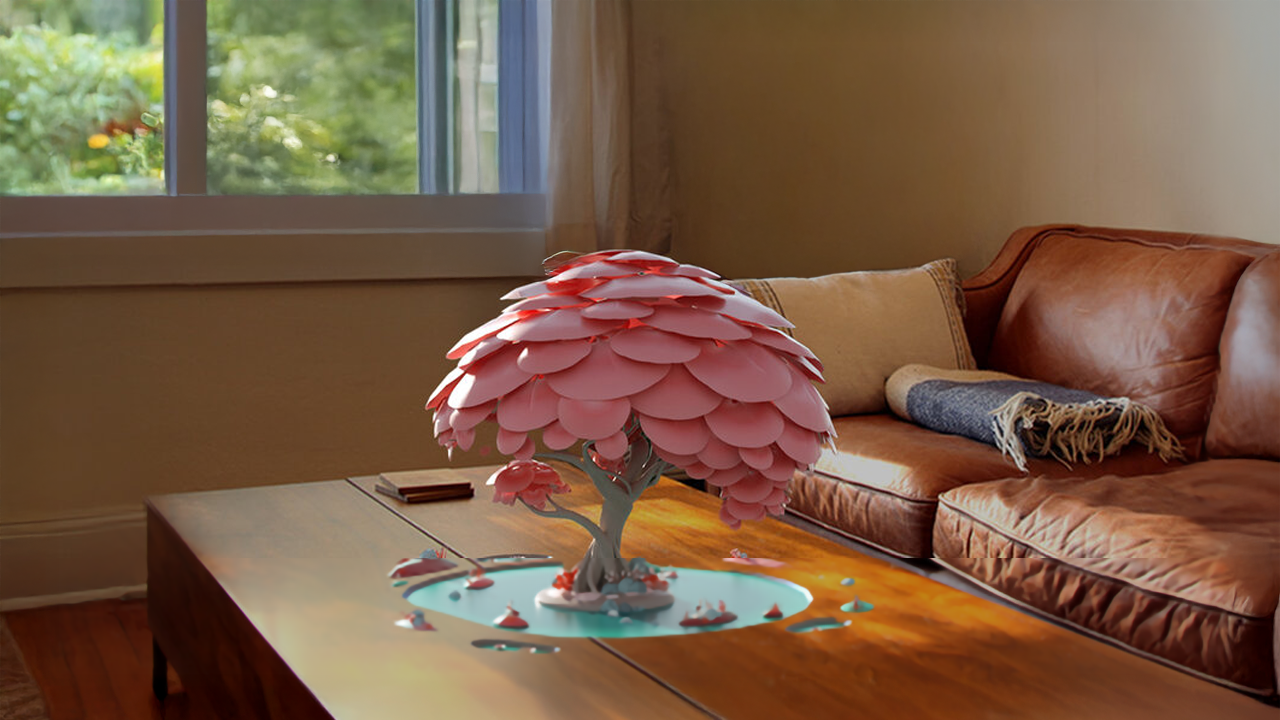
Spatial onboarding — placing a miniature tree on the user's table to teach gesture and 3D object interaction
The full out-of-box experience was mapped end to end as a single flow, connecting fit and calibration, spatial onboarding, and first launch into one continuous sequence — giving the team a shared reference for how each moment handed off to the next. 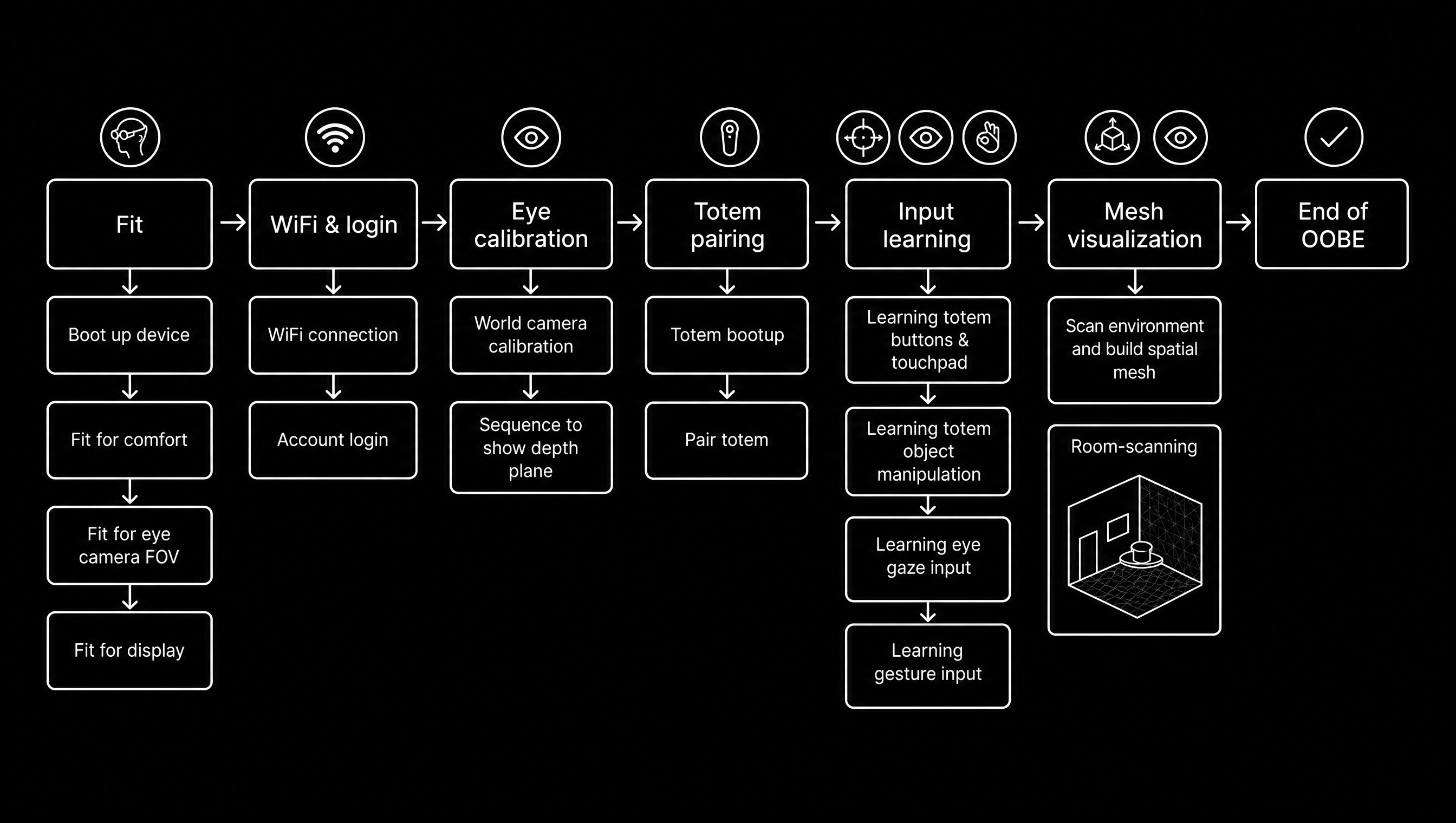
Out-of-box experience flow — the complete sequence from fit and calibration through spatial onboarding to first launch
Fit & Calibration
Making a brand-new device feel immediately comfortable and personalEvery user of Magic Leap One passed through the Fitting and Calibration experience before anything else. Sizing was based on interpupillary distance, with two headset sizes accommodating the majority of users. The experience used onboard sensors to guide users to the correct fit, pairing their controller, and calibrating eye tracking to ensure up to 95% accuracy. I developed a comprehensive motion guide and animation curve system that defined how every transition in the onboarding flow animated — smooth, readable, and spatially consistent. These standards were then carried forward across Lumin OS as the motion foundation for the entire operating system. 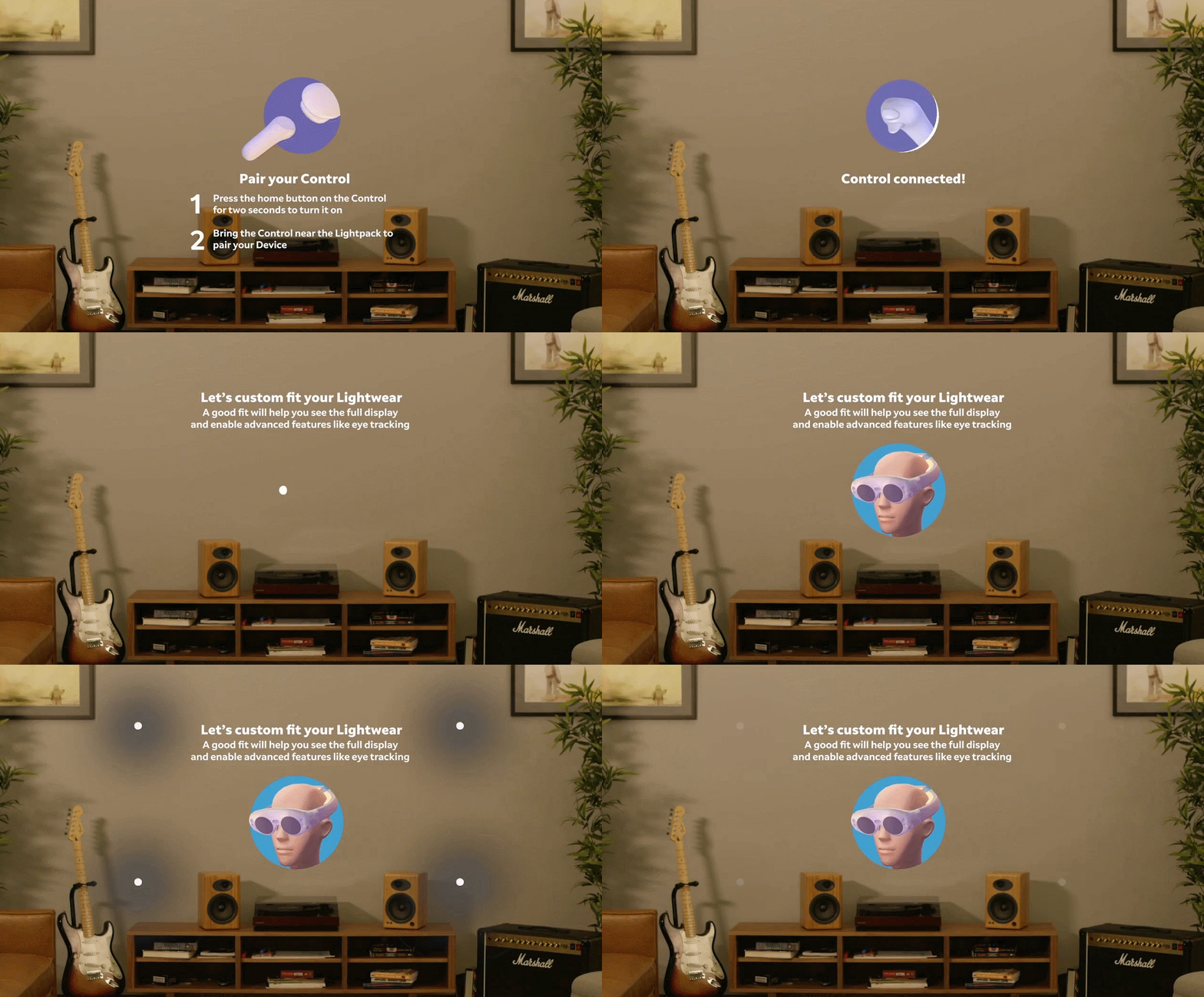
Onboarding flow — headset fit and controller pairing shown from user POV

High-resolution onboarding animation — state transitions including headset fit, controller tooltips, and settings, using the animation curve system I developed
The six essential curves that governed motion across LuminOS — including driftOne, the foundational easing curve, and two spring-based physics curves for gesture-driven interactions
Eclipse Effect
Enhancing buttons on an additive waveguide displayOur core principle was to enhance the real world — so any pixel we lit up would block the real world behind it. We wanted buttons to clearly read as buttons, but we didn't want them to cost a single pixel, even on hover. The Eclipse Effect: a cursor that moves behind the buttons and illuminates a glow, like the eclipse of the sun behind the moon. This solved two problems at once. First, the cursor never interfered with the visibility of icons and text. Second, it still provided continual feedback as the user moved their input behind and around the buttons. It also meant the button itself could stay 100% black, preserving maximum contrast for text and icons against cluttered real-world environments. 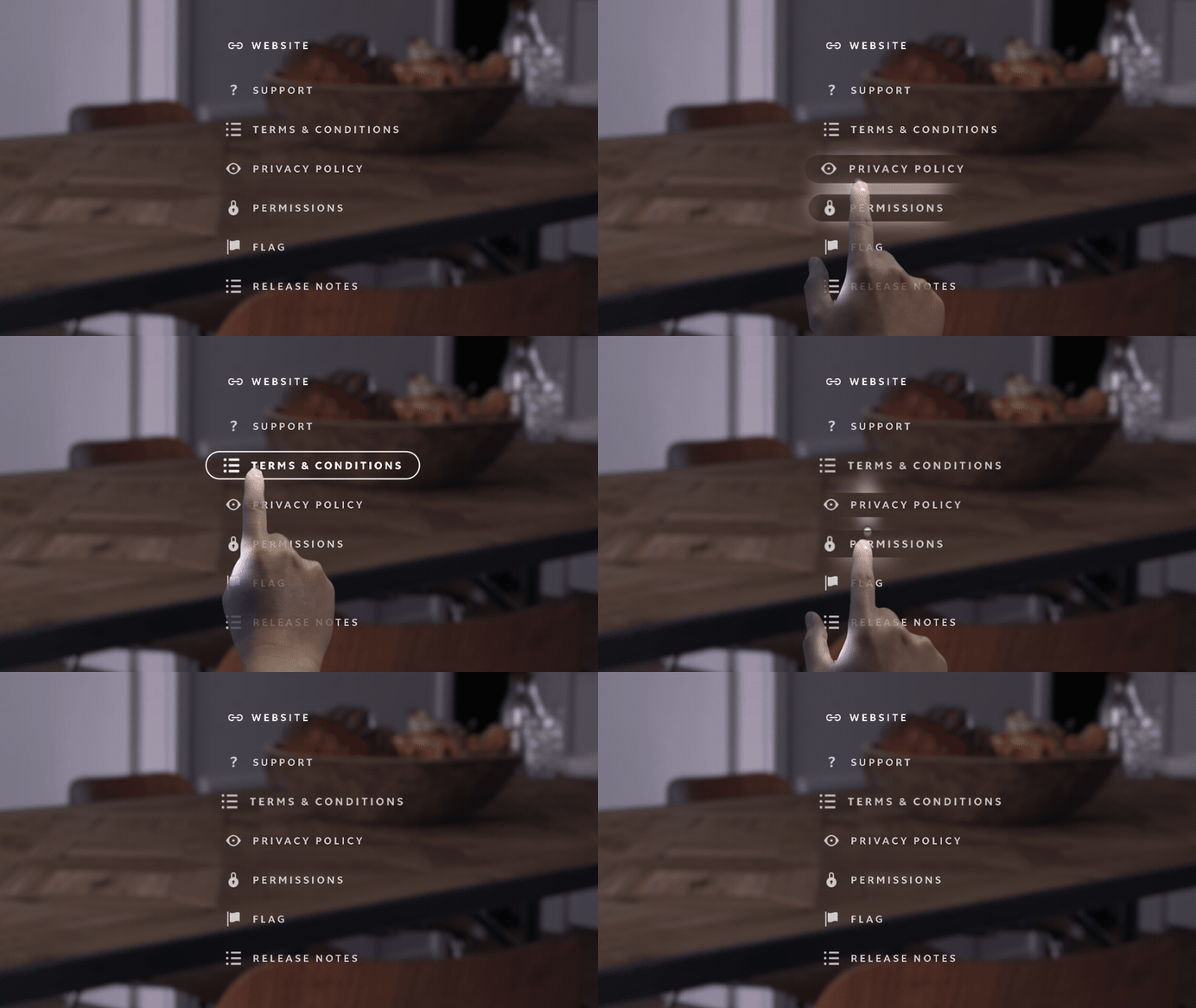
Eclipse Effect — the cursor glow moving across a menu, illuminating each button from behind without lighting a single pixel of the button itself

Eclipse Effect on a single button — the glow provides continual feedback while the button stays fully black for maximum contrast
The Moton
An emotive photon — teaching gesture through delightThe Moton was Magic Leap's original vision for how users would first encounter spatial computing — described by the CEO as an "emotive photon." Drawing on my VFX background, I developed it as a particle-based interactive entity that took advantage of the Magic Leap One's additive display, where black renders as transparent, allowing particles to appear to genuinely float within the user's real environment. The Moton responds to gesture and touch — following the user's finger, reacting to interaction — teaching the fundamental input model of the device without a single instruction screen. It was designed to be magical first and functional second, establishing an emotional relationship with the technology before asking anything of the user. An early concept explored navigation UI booting from a swarm of Motons — the interface emerging organically from the same particle language as the onboarding.The Moton's drifting, unpredictable movement through the space served a dual purpose: as users followed it with their eyes and hands, the device was quietly mapping their room, completing the spatial scanning needed for the OS to function. The user's curiosity was doing the technical work. 
Moton — particle-based interactive entity using the ML1 additive display to float within real space
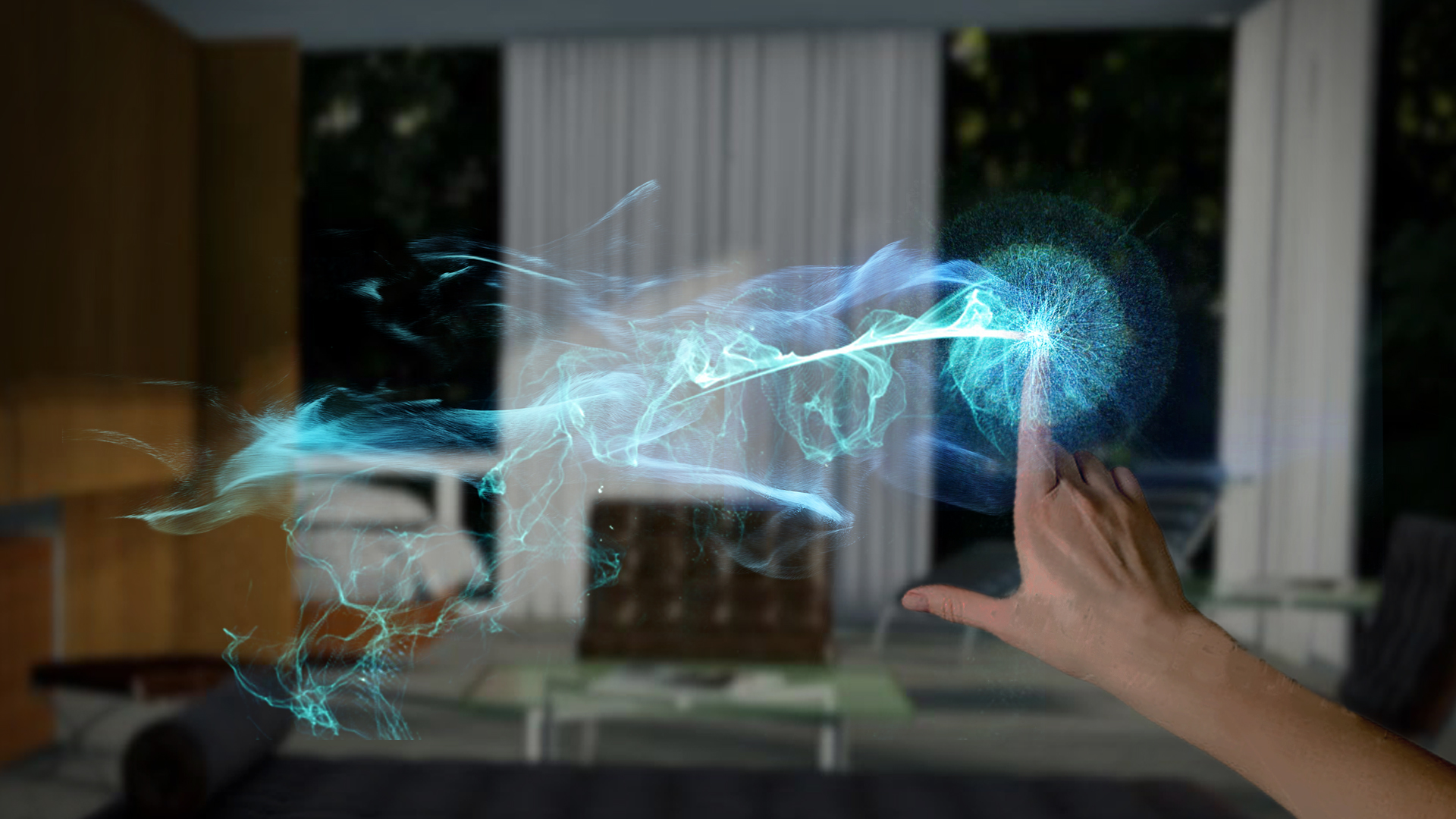
Moton trail interaction — the entity follows the user's finger, teaching gesture through a delightful, non-instructional encounter
Early concept — navigation UI emerging from a swarm of Motons, the interface born from the same particle language as onboarding
Natural Motion
A vision piece that defined what spatial computing could feel likeNatural Motion was a centerpiece animation created to communicate the magic and potential of the Magic Leap One as a medium — not as a product demo, but as a statement of vision. Animals form out of particles and move through a domestic living room: a flock of birds takes flight across the ceiling, a pack of dogs runs across a table, dolphins arc through the air, a ballerina spins, a horse gallops. Each creature builds from the same particle language as the Moton, grounding the wonder of the experience in a consistent visual world. The piece was shared company-wide by the CEO and became a touchstone for how Magic Leap communicated its vision internally and externally. Beneath the magic, it also served a critical technical purpose: as the animals moved through the space, they encouraged users to naturally look around their environment in every direction, allowing the device to complete its room scanning and spatial mapping without ever asking them to. Making a necessary technical step feel like wonder was the design intent from the start. Natural Motion — birds, dogs, dolphins, a ballerina, and a horse forming from particles in a living room environment
Startup Experience
Wonder as a first impression — the boot experienceThe Startup Islands experience plays during device boot — the moment a user first puts on the headset and the world loads around them. Drawing directly from the visual language of the spatial onboarding work, it uses trees, nature elements, and circular portal motifs to create a moment of genuine wonder as the OS initializes. Asset optimization was a critical design constraint: every element had to load as quickly as possible while the operating system was also loading in the background, requiring careful management of geometry complexity, texture resolution, and render order to deliver the experience without perceived delay. Startup Islands
— trees, nature elements, and circular portal motifs creating a moment of wonder as
Lumin OS initializes
Logo Animation
The first visual on Magic Leap OneThe Leaper is the animated logo that opens on Magic Leap One and brands the company's promotional and web content. Using original assets from The Mill, we adjusted layering, animation, and timing to produce its light-built form. As the first thing a user sees, it also had to load instantly — a critical constraint that shaped how the piece was optimized for on-device performance. The Leaper — Magic Leap's animated logo, built from light and directed with original assets from The Mill
|